QR ticket scanner
Your phone camera becomes an entry ticket scanner. No barcode guns or extra hardware.
Book tickets, save events, and discover what's happening near you.
Eventsflare Check-In turns your phone into a QR ticket scanner. Scan a guest’s ticket, see their name and ticket type straight away, and stop the same ticket being used twice. No paper lists and no scrolling through spreadsheets. It’s free with every event you list on Eventsflare.
List your event free → Partner login
Already listing with us? Log in to your partner account, open your event and tap the scan button.
A queue outside, a clipboard, someone scrolling a spreadsheet for a name. That’s how many events still start. Manual event entry management is slow, easy to cheat and stressful for your door team. A proper event check-in app fixes all three.
| At the door | Paper list or spreadsheet | Eventsflare Check-In |
|---|---|---|
| Finding the guest | Scroll a printout or sheet for the name | Scan their QR ticket, or search by name or booking reference |
| Same ticket used twice | Hard to spot when the door is busy | Refused on screen, with the time of the first check-in |
| More than one gate | Two lists that never match | Every phone checks against the same guest list |
| Ticket types | Ask, guess, or check a second list | Ladies, Stag, Couple, early-bird and every other ticket type shown on scan |
| No QR on hand | Long back-and-forth at the door | Type the booking reference and check the guest in |
| Cost | Hours of staff time and printouts | Free with every event you list on Eventsflare |
From listing to the last guest through the door, it takes four steps. Nothing to install, no extra hardware and no separate guest list app to sync.
Create a free Eventsflare partner account and add your event. Choose free RSVPs or paid tickets, and set up ticket types such as early-bird, Ladies, Stag or Couple entry. AI Coach helps you write a stronger title and description.
Attendees book on your event page and pay by UPI, card or net banking, or RSVP for free. Every booking gets a confirmation email with a QR code ticket and a booking reference, which is all your door team needs.
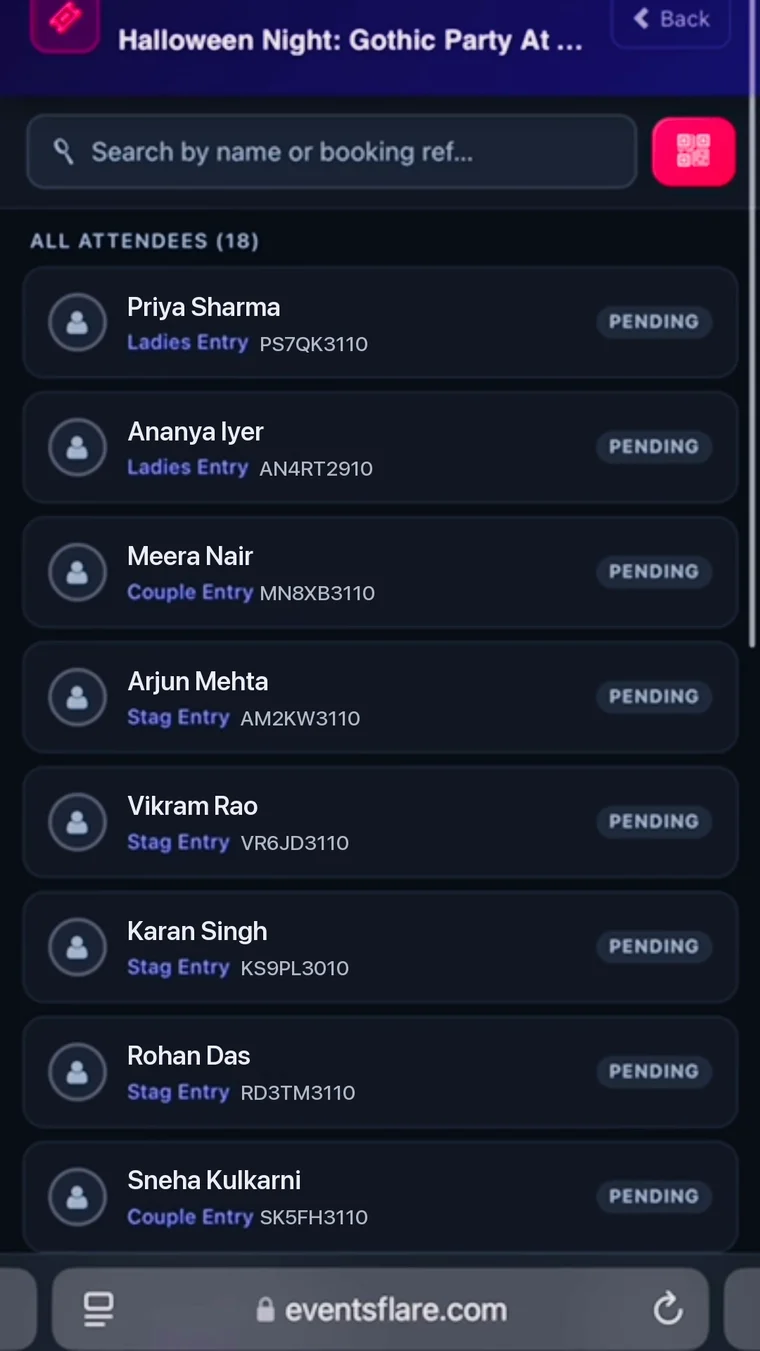
On the event day, log in to your partner account and open your event. You’ll see your full attendee list with each guest’s ticket type, a search bar and the pink scan button. Add your door team as users on your account and each person can scan from their own phone.
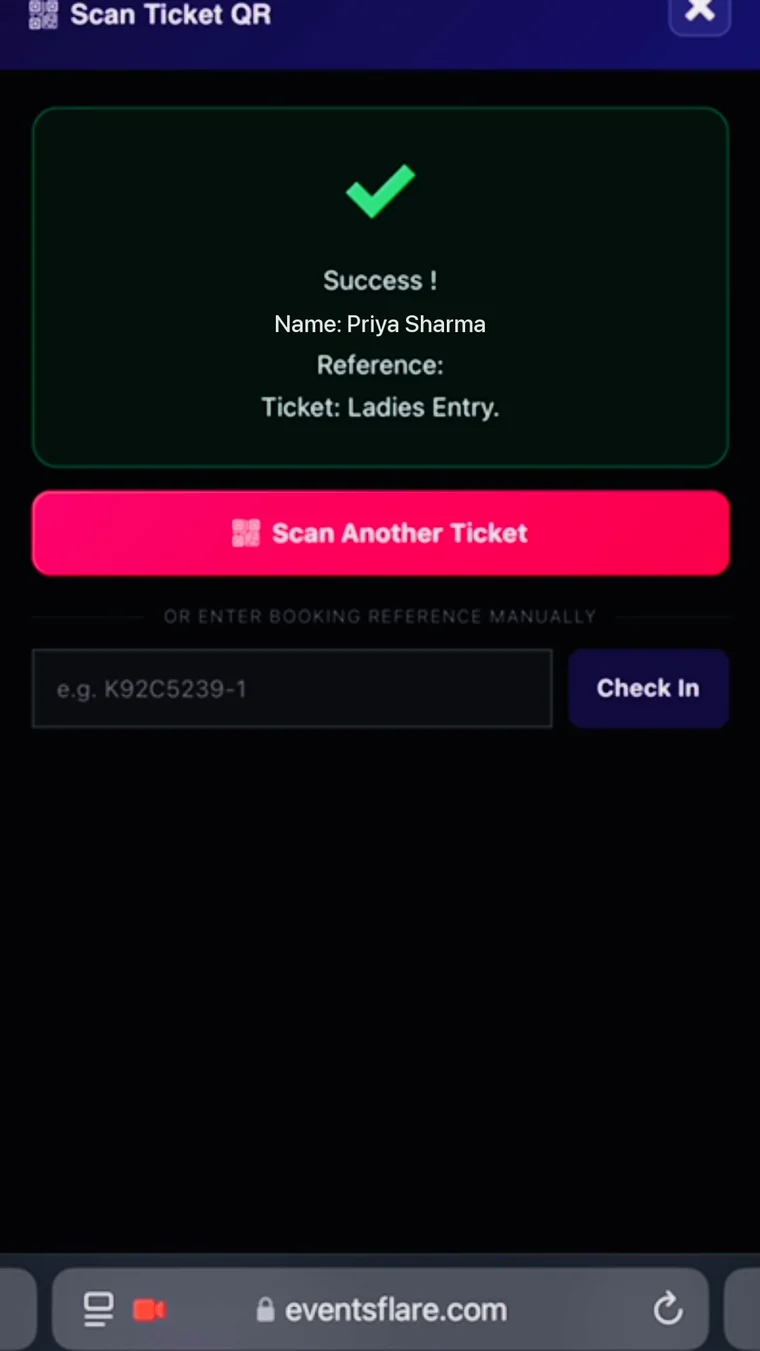
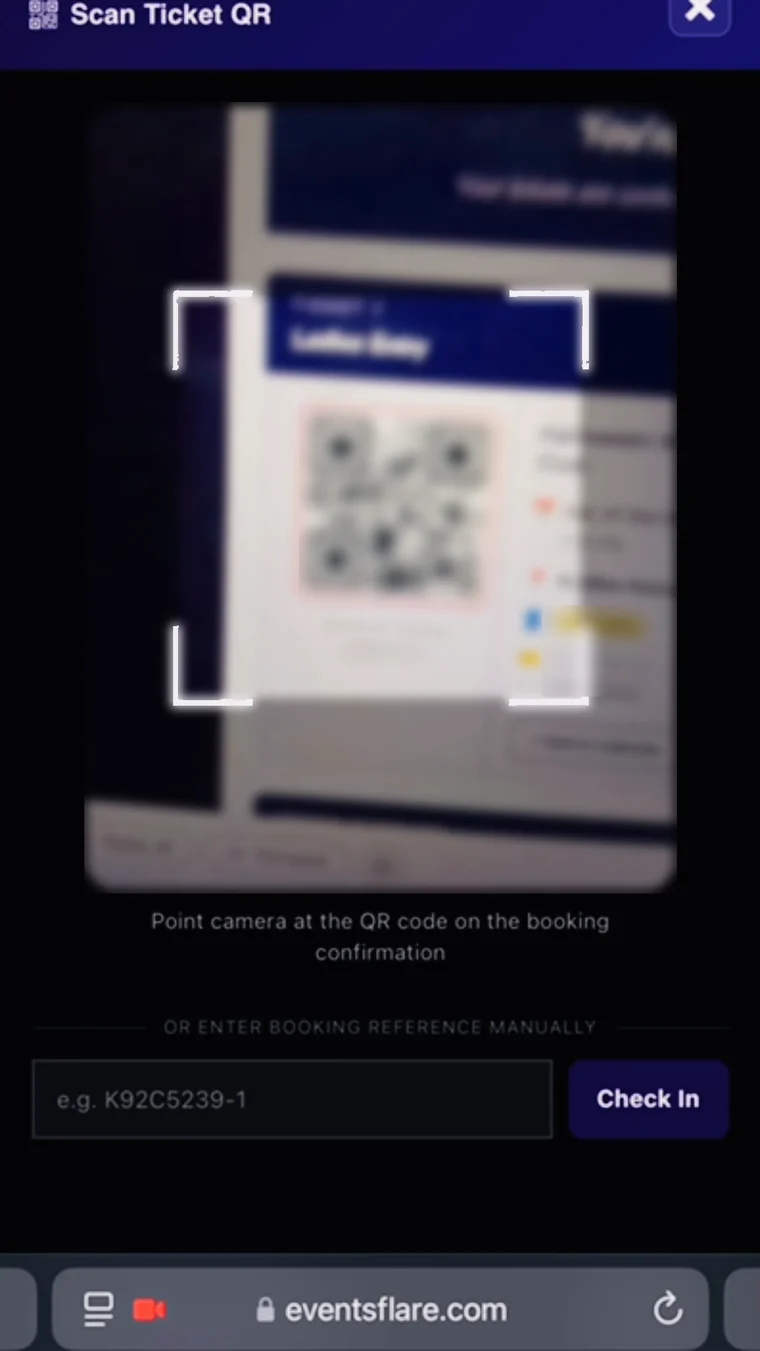
Point your phone camera at the guest’s QR ticket. A green Success screen confirms the check-in and shows the guest’s name and ticket type. Tap Scan Another Ticket and keep the line moving. If the ticket has already been used, the scan is refused and shows when it was first checked in.
A focused check-in tool, built into the same platform you use to list your event and sell tickets.
Your phone camera becomes an entry ticket scanner. No barcode guns or extra hardware.
A ticket that has already been used is refused, with the time it was first checked in.
Add your team to your partner account and scan from as many phones as you have gates.
See the guest’s name and whether it’s Ladies, Stag, Couple, VIP or early-bird.
Find any guest by name or booking reference, or type the reference when there’s no QR.
One booking with several tickets? Check the whole group in together.
Every guest shows as pending or checked in, and a tap undoes a mistake.
Check-in lives inside your logged-in partner account, so your guest list is never public.
Big events rarely have just one way in. With Eventsflare, every gate and door runs from the same guest list. Each member of your door team logs in on their own phone and scans tickets, and every scan is verified against your bookings at that moment.
That means a ticket checked in at the main gate can’t be used again at the side door, a forwarded screenshot won’t get a second person in, and a ticket that isn’t booked for your event won’t check in at all. It’s ticket verification and guest entry management without extra hardware or paper.
From a 20-person workshop to a packed Saturday night, Eventsflare Check-In fits any in-person event.
A nightclub guest list app for busy doors, with Ladies, Stag and Couple entry shown on every scan.
Run gate and door management for every event at your venue from one partner account.
Selling tickets to your own gigs? List the show, sell tickets and check your fans in yourself.
Art, music, fitness and yoga sessions get a simple attendee check-in, with no spreadsheets to print.
Startup meetups, networking nights and conferences get fast QR code check-in at registration.
College clubs, community groups and creators get professional event entry without a professional budget.
Check-in works best when it’s connected to your ticketing. On Eventsflare, your event page, your bookings and your door all live in the same partner account, so there’s nothing to export or import on the day.
Whatever event check-in app you use, these habits keep the line moving. Here’s how organisers run a smooth door with Eventsflare.
Yes. Check-in is included free with every event you list on Eventsflare. Listing an event and taking free RSVPs costs nothing. If you sell paid tickets, a small platform fee applies and is shown before you publish.
No. Eventsflare Check-In runs in your phone’s web browser on iPhone or Android. Log in to your partner account, open your event and tap the scan button.
Yes. Add your door team as users on your partner account and each person can scan from their own phone. Every scan is checked against the same guest list, so a ticket can only be checked in once, whichever gate or door it reaches.
The scan is refused. The screen shows that the ticket has already been checked in, with the time of the first check-in, so a screenshot or forwarded ticket cannot get a second person through the door.
Yes. Type the guest’s booking reference into the manual check-in box, or search your attendee list by name or booking reference and tap the guest to check them in.
When one booking has several tickets, scanning one ticket offers to check in all the tickets in that booking with a single tap, so groups get through together.
Yes. Every booking on Eventsflare, free or paid, gets a QR code ticket that you can scan at the door.
No. Eventsflare Check-In verifies tickets booked through Eventsflare. List your event on Eventsflare and every booking gets a QR ticket ready to scan.
Eventsflare covers all major Indian cities, including Bangalore, Mumbai, Delhi NCR, Pune, Hyderabad, Chennai and Kolkata. You can also list online events.
Attendees pay by UPI, debit or credit card, or net banking. You also get an attendee list, automated ticket emails, discount codes, early-bird pricing and door check-in.
List your event on Eventsflare for free, sell tickets your way and check every guest in with a single scan.